Interactive web app · Built-in video tutorial

Zero-based budgeting, per paycheck.

Every paycheck gets distributed across bills, categories, and savings goals. Nothing unassigned. No more wondering if you can afford rent three days before payday.

PayGPayVISA
🔒Secure checkout via Stripe
▶ Try the live demo, free
Instant download Works in modern browsers (Chrome, Safari, Firefox, Edge) No subscription Privacy first
30-day money-back guarantee. No questions, no clawbacks.

Touch it. Try it. No download.

This is the free Lite version, running right here in your browser. Type a paycheck amount, tap Suggest Distribution, watch every dollar get a job. The full version is yours the moment you buy.

Tap ⛶ Full screen to use it like the real app
Paycheck Budget Planner · Free Lite preview

Everything you need, nothing you don't

Each feature designed to make this feel like a real app, not a spreadsheet.

💬
Built-in money coach
Ask “what is safe to spend this week?” and get an instant answer from your real numbers. No account, works offline.
📅
Paycheck Timeline widget
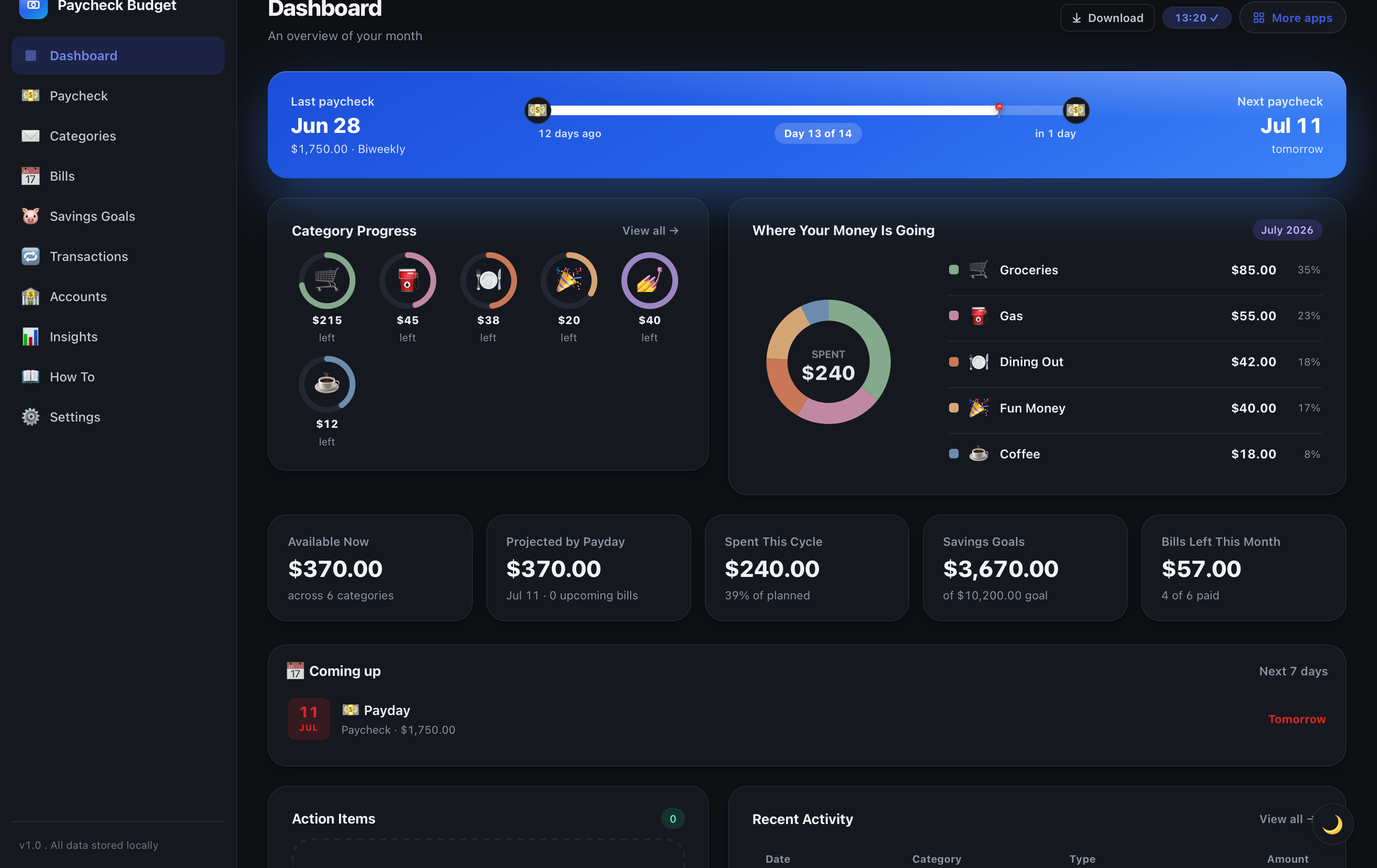
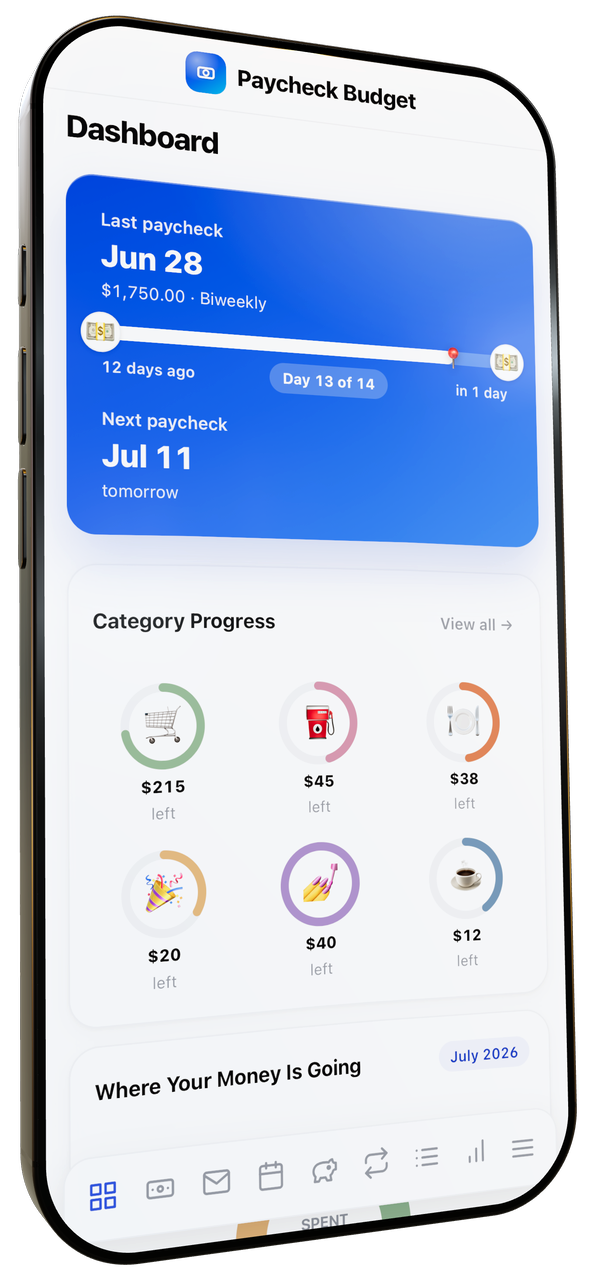
Visual timeline showing last paycheck, current cycle progress, and countdown to next payday. The signature feature of this planner.
🏷️
Per-paycheck bill assignment
Tag each bill to Paycheck 1 or 2 of the month. Know exactly which paycheck covers rent vs streaming.
⏱️
Any pay schedule
Weekly, biweekly, semi-monthly, monthly. Built for biweekly earners but works for any cadence.
💰
Smart distribution in one tap
Type paycheck amount, tap Suggest. Bills, categories, and savings fill automatically.
🎯
Savings goals
Emergency fund, vacation, holidays. Contribute a slice every paycheck. Progress rings show how close you are.
🎬
Built-in video tutorial
12 chapters explaining the timeline, distribution, bill tagging. Click any step to jump to that demo.
🌙
Light + dark mode
One-tap toggle. Auto-follows your system preference. Easy on the eyes day or night.
One-click export
Save as PDF, JSON backup, or CSV. Import a backup any time to restore on a new device.
📅
Coming up next
See the next 7 days of bills, payday, and savings goals right on the Dashboard. Red for today/tomorrow, amber for 2-3 days. No more nasty surprises.
📲
Works like a real app on iPhone & Android
On iPhone: Share → Add to Home Screen. On Android: ⋮ menu → Add to Home screen. Lives like a native app. Open from your home screen, your data is right there. No subscription, no account.

Watch it run on Mac & iPhone.

Real interactions, real data. No App Store. No subscription.

A real app in your pocket.

No App Store. No subscription. Add it to your home screen and it launches like any other app. Your data stays on your device.

Paycheck timeline
Paycheck timeline
Every paycheck, every bill, every dollar accounted for.
Real navigation
Real navigation
Side drawer with tabs, dark mode toggle, save indicator. Not a webpage.
Calendar tap
Calendar tap
Tap any date to add a bill or paycheck. Auto-distributed across the month.
📱 iPhone & Android · 💻 Mac & PC · 🔒 Your data stays local

Every section, ready to use on day one.

Real screenshots from the app, not mockups. Get every dollar a job before the paycheck even lands.

Dashboard tab
Dashboard
What's left, what's spent, what's coming up.
Distribute paycheck tab
Distribute paycheck
Type your paycheck amount. Tap Suggest. Done.
Bills per paycheck tab
Bills per paycheck
Tag each bill to Paycheck 1 or Paycheck 2.
Insights tab
Insights
Where every paycheck went. Donut + cashflow.

5 years from now, you'll have paid…

Compare what budgeting tools cost over 5 years. Same data, very different math.

The subscription pattern
Monthly budgeting app subscriptions
€900
over 5 years
€15/month × 60 months. Cancel and lose your history. Miss a month and lose access.
LaunchLab
Paycheck Budget Planner, paid once
€14.86
forever
Pay once. Yours forever. No subscription. No account. Works offline. Lifetime updates.

An actual app, not cells and formulas

Side by side: what a static spreadsheet template gives you vs what this app gives you. Both cost less than a takeout meal. Only one feels like a real product.

The old way · static template
CategoryBudgetSpent
Venue85004500
Catering48001800
Photo28001500
Flowers1850500
DJ12000
Dress1600800
Total207509100
The new way · interactive app
Paycheck 1 of 2
May 15 · Next: May 28
Spent this cycle
$240
Available now$370
Bills left4 / 6
The old way
The new way
Live charts that update as you type
Color-coded categories with progress bars
Built-in 12-chapter video tutorial
Works on Mac, PC, tablet, iPhone, and Android (add to home screen)
Dark mode with one click
Print to a beautiful PDF in one click
Smart suggestions + auto calculations
JSON backup + import (your data stays portable)
No subscription, no account, no data shared
Hover, drag, animate — feels like an app, not a sheet

FAQ

I get paid biweekly. Does this work?
This is specifically designed for biweekly earners. The Paycheck Timeline widget tracks your 14-day cycle. Per-paycheck bill assignment lets you split rent across Paycheck 1 vs Paycheck 2.
How is this different from the Cash Envelope Planner?
Cash Envelope is monthly-thinking. Paycheck Budget is paycheck-thinking (distribute every paycheck zero-based). Different mental models. Some buyers own both.
Does my data stay private?
Yes. Everything lives on your device. No account, no login, no internet needed after download.
Can I customize for my pay schedule?
Yes. Settings has a Paycheck Schedule card with frequency dropdown, last paycheck date, and typical paycheck amount.

We also build other apps

Same design language, same privacy-first approach. Pick the one that matches your need.

Ready to try it?

Instant download. One-time purchase. Works in modern browsers (Chrome, Safari, Firefox, Edge). Launch pricing.

PayGPayVISA
🔒Secure checkout via Stripe·30-day money-back guarantee